
티스토리 뷰
[Spring AI] (3) : 관심 종목(Watchlist) CRUD 구현
https://ekeprl.tistory.com/71 [Spring AI] (2) : Yahoo Finance 연동 - 주식 가격 조회 구현https://ekeprl.tistory.com/69 [Spring AI] (1) : Google Gemini 연동 - 뉴스 요약 구현https://ekeprl.tistory.com/68 [Spring Security - JWT] (6) : 재발
ekeprl.tistory.com
이전 포스팅에선 관심 종목 CRUD 기능을 구현했다.
이번 포스팅은 등록한 관심종목의 현재가를 주기적으로 체크하여 목표가에 도달할 시 텔레그램을 통해
알림을 보내는 기능을 구현해보려 한다.
1. 텔레그램 봇 생성
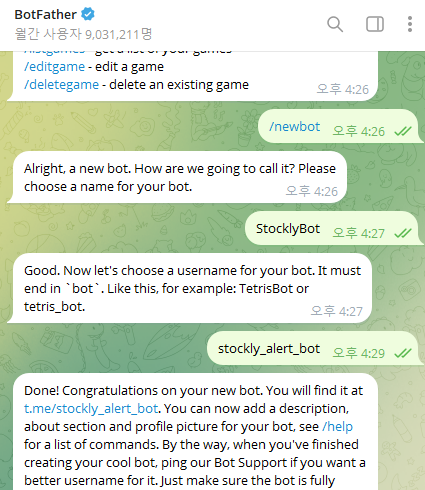
텔레그램에서 @BotFather을 검색해서 /newbot을 입력한다.
Bot의 이름을 정하여 Bot을 생성한다.
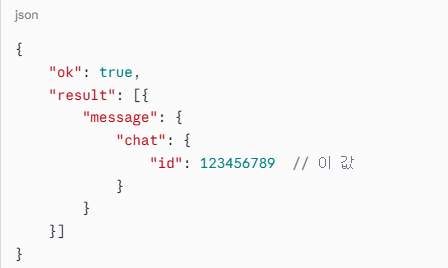
2. chat_id 확인

봇 채팅창에서 메시지를 전송 후 브라우저에서 아래 URL을 접속한다.
https://api.telegram.org/bot {토큰}/getUpdates
#{토큰}의 값은
@BotFather에서 "/mybots"을 입력하면 확인할 수 있다.
3. application.yml 설정 작성
telegram:
  bot-token: #{토큰}
  chat-id: #{chat_id}
1~2번에서 확인한 값들을 작성해 준다.
4. WatchlistMapper / WatchlistMapper.xml
@Mapper
interface WatchlistMapper {

    fun insert(watchlist: WatchlistModel)
    fun findByUserId(userId: String): List<WatchlistModel>
    fun deleteById(id: String)


    fun findAll(): List<WatchlistModel>

}
<select id="findAll" resultType="com.ekeprl.stockly.watchlist.model.WatchlistModel">
SELECT id, user_id as userId, symbol, name, target_price as targetPrice, created_at as createdAt
FROM watchlist
</select>
스케쥴러에서 등록한 관심 종목을 조회하기 위해 findAll() 함수를 추가해 준다.
5. StockScheduler
@Component
class StockScheduler(
    private val : WatchlistMapper,
    private val stockService: StockService,
    private val telegramService: TelegramService,
) {
    @Scheduled(fixedDelay = 60000) // 1분마다 실행
    fun checkPrice() {
        val watchlist = watchlistMapper.findAll() // 전체 관심종목 조회

        watchlist.forEach { item ->
            if (item.targetPrice == null) return@forEach

            val stock = stockService.fetchPrice(item.symbol)

            if (stock.price >= item.targetPrice!!) {
                telegramService.sendMessage(
                    "🚨 목표가 도달!\n" +
                            "종목: ${item.name} (${item.symbol})\n" +
                            "현재가: ${stock.price}\n" +
                            "목표가: ${item.targetPrice}"
                )
            }
        }
    }
}
- @Scheduled(fixedDelay = 60000) — 1분마다 실행하도록 작성했다.
- findAll() — 전체 관심 종목 조회하는 함수를 실행한다.
- targetPrice가 null이면 스킵한다.
- Yahoo Finance에서 현재가 조회한다.
- 목표가에 도달하면 텔레그램 알림을 발송한다.
6. Postman 테스트
POST /watchlist
{
    "symbol": "AAPL",
    "name": "Apple Inc.",
    "targetPrice": 1.0
}
targetPrice는 제일 테스트용으로 낮게 설정했다.

설정한 대로 1분마다 텔레그램으로 알림이 오는 것을 확인할 수 있다.
이것으로 프로젝트의 중요 기능인 관심 종목 등록 >> 가격 모니터링 >> 텔레그램 알림까지 구현을 완료했습니다.
이상 포스팅 마치겠습니다.
감사합니다.
'Project > Stockly' 카테고리의 다른 글
| [Stockly] (5) : React 프론트엔드 환경 설정 (0) | 2026.07.08 |
|---|---|
| [Spring AI] (3) : 관심 종목(Watchlist) CRUD 구현 (0) | 2026.06.30 |
| [Spring AI] (2) : Yahoo Finance 연동 - 주식 가격 조회 구현 (0) | 2026.06.30 |
| [Spring AI] (1) : Google Gemini 연동 - 뉴스 요약 구현 (0) | 2026.05.07 |
- Total
- Today
- Yesterday
- AI
- dbeaver
- 백엔드
- 특일정보
- 서버호스트
- Git
- 의존성
- 게시판
- insert
- ubuntu
- session저장
- gradle
- MariaDB
- GitHub
- Insert오류
- InetAddress
- Postman
- CRUD
- 명령줄이 너무 깁니다
- springsecurity
- jwt
- Powershell
- securityconfig
- dependencies
- kotlin
- null
- Column count doesn't match value count at row 1
- JAR매니패스트
- Spring Security
- spring ai
| 일 | 월 | 화 | 수 | 목 | 금 | 토 |
|---|---|---|---|---|---|---|
| 1 | ||||||
| 2 | 3 | 4 | 5 | 6 | 7 | 8 |
| 9 | 10 | 11 | 12 | 13 | 14 | 15 |
| 16 | 17 | 18 | 19 | 20 | 21 | 22 |
| 23 | 24 | 25 | 26 | 27 | 28 | 29 |
| 30 | 31 |