
티스토리 뷰
[Spring Security - JWT] (4) : 로그인 API 및 Postman 테스트
evolutioning 2026. 4. 27. 23:11
[Spring Security - JWT] (3) : JwtFilter
이전 포스팅을 통해 JWT 토큰의 생성과 검증을 담당하는 JwtUtil을 작성했다.https://ekeprl.tistory.com/64 이번 포스팅은 매 요청마다 JWT 토큰을 검증하는 JwtFilter를 작성해보려 한다. 1.JwtFilter@Componentclass
ekeprl.tistory.com
이전 포스팅을 통해 JwtFilter 작성을 알아보았다.
이번 포스팅은 로그인 / 회원가입 API 작성 및 Postman 테스트를 진행해보려 한다.
1. Controller
@RestController
@RequestMapping("/auth")
class UserController(
    private val userService: UserService,
) {

    // 회원가입
    @PostMapping("/register")
    fun register(@RequestBody request: RegisterRequest): ApiResponse<Unit> {
        userService.register(request)
        return ApiResponse.success()
    }

    // 로그인
    @PostMapping("/login")
    fun login(@RequestBody request: LoginRequest): ApiResponse<String> {
        val token = userService.login(request)
        return ApiResponse.success(token)
    }
}

/auth/** 는 SecurityConfig에서 permitAll()로 설정했기 때문에 인증 없이 접근 가능하다.
2. Service
@Service
class UserService(
    private val userMapper: UserMapper,
    private val passwordEncoder: PasswordEncoder,
    private val jwtUtil: JwtUtil,
) {

    // 회원가입
    fun register(request: RegisterRequest) {
        // 아이디 중복 체크
        if (userMapper.findById(request.id) != null) {
            throw IllegalArgumentException("이미 사용 중인 아이디입니다.")
        }
        // 이메일 중복 체크
        if (userMapper.findByEmail(request.email) != null) {
            throw IllegalArgumentException("이미 사용 중인 이메일입니다.")
        }

        var user = UserModel.create(
            id = request.id,
            email = request.email,
            password = passwordEncoder.encode(request.password),
            username = request.username,
        )

        // userCode UUID 중복 시 재시도
        repeat(3) {
            try {
                userMapper.insert(user)
                return
            } catch (e: DuplicateKeyException) {
                user = user.copy(usercode = UUID.randomUUID().toString().replace("-", ""))
            }
        }
        throw IllegalStateException("중복된 회원id입니다. 다른 id를 입력해주세요.")
    }

    // 로그인
    fun login(request: LoginRequest): String {
        val user = userMapper.findByEmail(request.email)
            ?: throw IllegalArgumentException("이메일 또는 비밀번호가 올바르지 않습니다.")

        if (!passwordEncoder.matches(request.password, user.password)) {
            throw IllegalArgumentException("이메일 또는 비밀번호가 올바르지 않습니다.")
        }

        if (user.status == UserModel.Status.INACTIVE) {
            throw IllegalArgumentException("비활성화된 계정입니다.")
        }

        return jwtUtil.generateAccessToken(user.id, user.email, user.role.toAuthority())
    }
}
회원가입 : 아이디/이메일로 중복 체크를 진행하고, 비밀번호를 암호화에 저장한다.
getUUID로 새로운 userCode를 생성할 때 최대 3번까지 재시도한다.
로그인 : 이메일로 User를 조회하고, 비밀번호를 검증 후 AccessToken을 반환한다.
3. Mapper
@Mapper
interface UserMapper {
    // 회원가입
    fun insert(user: UserModel)

    // 이메일로 조회 (로그인, 중복체크)
    fun findByEmail(email: String): UserModel?

    // ID로 조회
    fun findById(@Param("id") id: String): UserModel?
    }
4.Mapper.xml
<mapper namespace="auth.user.mapper.UserMapper">

    <resultMap id="userResultMap" type="UserModel" autoMapping="false">
        <id     property="id"         column="id"/>
        <result property="usercode"   column="user_code"/>
        <result property="email"      column="email"/>
        <result property="password"   column="password"/>
        <result property="username"   column="username"/>
        <result property="role"       column="role"/>
        <result property="status"     column="status"/>
        <result property="provider"   column="provider"/>
        <result property="providerId" column="provider_id"/>
        <result property="createdAt"  column="created_at"/>
        <result property="updatedAt"  column="updated_at"/>
    </resultMap>

    <insert id="insert" parameterType="UserModel">
        INSERT INTO users (
            id, user_code, email, password, username,
            role, status, provider, provider_id,
            created_at, updated_at
        ) VALUES (
                     #{id}, #{usercode}, #{email}, #{password}, #{username},
                     #{role}, #{status}, #{provider}, #{providerId},
                     #{createdAt}, #{updatedAt}
                 )
    </insert>

    <select id="findByEmail" resultMap="userResultMap">
        SELECT * FROM users
        WHERE email = #{email}
    </select>

    <select id="findById" resultMap="userResultMap">
        SELECT * FROM users
        WHERE id = #{id}
    </select>


</mapper>
MyBatis를 이용해 users 테이블과 매핑했고, resultMap으로 프로퍼티를 명시적으로 매핑했다.
코드는 이렇게 작성했고, 다음으로 Postman을 이용해 테스트를 진행해보려한다.
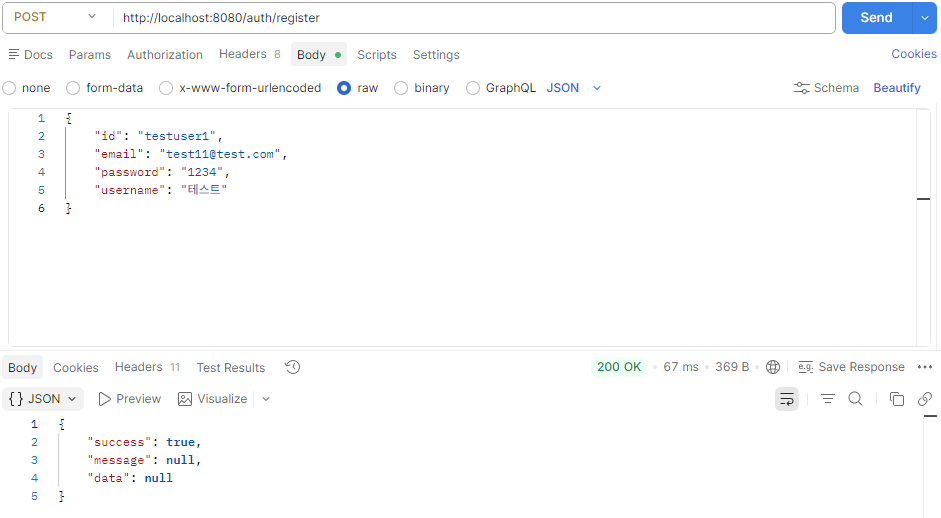
회원가입 테스트
- 메서드 : POST
- URL : http://localhost:8080/auth/register
- Body → raw → JSON 선택
- 결과확인
로그인 테스트
- 메서드 : POST
- URL : http://localhost:8080/auth/login
- Body → raw → JSON
- 결과확인

Token 테스트
1. 메서드 : GET
2. URL : http://localhost:8080/test
3.header
key : Authorization
value : Bearer + {로그인 응답의 토큰값}

이상으로 포스팅을 마치겠습니다.
감사합니다.
'Spring > Security(JWT)' 카테고리의 다른 글
| [Spring Security - JWT] (6) : 재발급 / 로그아웃 API + Postman 테스트 (0) | 2026.04.28 |
|---|---|
| [Spring Security - JWT] (5) : Refresh Token 구현 (0) | 2026.04.28 |
| [Spring Security - JWT] (3) : JwtFilter (0) | 2026.04.24 |
| [Spring Security - JWT] (2) : JwtUtil (1) | 2026.04.24 |
| [Spring Security - JWT] (1) : SecurityConfig 설정 (0) | 2026.04.22 |
- Total
- Today
- Yesterday
- securityconfig
- session저장
- dbeaver
- Insert오류
- AI
- JAR매니패스트
- dependencies
- GitHub
- 의존성
- jwt
- 게시판
- kotlin
- Git
- Powershell
- CRUD
- 특일정보
- 백엔드
- springsecurity
- ubuntu
- 명령줄이 너무 깁니다
- null
- insert
- MariaDB
- gradle
- Spring Security
- InetAddress
- 서버호스트
- Postman
- Column count doesn't match value count at row 1
- spring ai
| 일 | 월 | 화 | 수 | 목 | 금 | 토 |
|---|---|---|---|---|---|---|
| 1 | ||||||
| 2 | 3 | 4 | 5 | 6 | 7 | 8 |
| 9 | 10 | 11 | 12 | 13 | 14 | 15 |
| 16 | 17 | 18 | 19 | 20 | 21 | 22 |
| 23 | 24 | 25 | 26 | 27 | 28 | 29 |
| 30 | 31 |